
Reach a participant in the moment that matters.
A JITAI delivers the right support at the right time — adapting to a person's real-time state, location, and physiology instead of a fixed schedule. mEMA gives you five ways to build one, from a single survey answer to layered Garmin biometrics.
5 trigger channels | 7+ Garmin signals | ∞ triggers per participant |
● ● ● DECISION RULE |
1 IF (60-sec stress > 10) AND 2 (steps today < 1000) 3 OR (5-min heart rate < 70) 4 # firing… 5 THEN → deliver "Grounding" survey 6 + alert Support Team |
THE IDEA
Support that shows up only when it's useful.
Static, one-size-fits-all reminders either pester people when they're doing fine or arrive too late when they're not. A JITAI watches for the right conditions and intervenes at moments of vulnerability or opportunity — which is exactly what protects against alert fatigue and keeps participants engaged.
01 · SENSE Real-time signal Survey answers, Garmin biometrics, and GPS location stream in as participants go about their day. | 02 · DECIDE Your rules run At each decision point, mEMA checks the incoming data against the logic you defined. | 03 · ACT Tailored support The platform fires a survey, message, or alert — to the participant, or to their care team. |
…and stays quiet the rest of the time. Frequency governors cap how often any trigger can fire, so you never over-treat.
The four parts of a JITAI, in mEMA terms.
If you know the JITAI framework, here's where each component lives in the platform.
Decision point When the system asks “should I act?” | Every survey response, every Garmin sampling window (60 s, 5 min, 10 min), and every geofence state change. Day Start / Day End bound when decision points exist at all. |
Tailoring variable What it looks at | The signal a condition reads — a survey answer, a geofence position or dwell time, or a Garmin metric, evaluated as an absolute value or as a percent of the participant’s own baseline. |
Intervention option What it can do | Deliver a survey, send an in-app message, email or SMS a staff member, route to the Support Team — or stay quiet. |
Decision rule How it chooses | The trigger expression itself: conditions joined by and / or, grouped with parentheses, written in Advanced Garmin Triggers or set on a survey question. Frequency governors decide whether a satisfied rule actually delivers. |
Pick the channel that fits your protocol.
Every trigger reacts to one of three inputs — a survey answer, a location, or a biometric — and can route its action to the participant, to a care-team member, or to a researcher's inbox or phone.
TRIGGER 01 SURVEY-DRIVEN Email on a response |
A participant's answer to a specific question sends an email to study staff — the simplest way to route a flag to whoever is watching the inbox.
EXAMPLE · DEPRESSION STUDY A participant rates their mood ≤ 2 / 10 or endorses a hopelessness item. An email lands with the on-call clinician within minutes of the response. GOES TO Researcher / clinician email |
TRIGGER 02 SURVEY-DRIVEN SMS on a response |
Same response logic, delivered as a text message when reaching someone quickly matters more than an email would allow.
EXAMPLE · SUBSTANCE-USE RECOVERY A participant reports a strong craving on a momentary check-in. An SMS pings the counselor on rotation so they can follow up before the moment passes. GOES TO On-call staff mobile |
TRIGGER 03 LICENSED Message or survey to the Support Team |
The Support Team turns a flag into a real-time, in-app workflow. A trigger can drop a message to a caregiver or cohort member, prompt that person to complete a survey about the participant, or route straight back to the participant with their own message or follow-up survey — no third-party step required. A configurable delay (minimum 1 minute) governs delivery.
EXAMPLE · CAREGIVER–CHILD DYAD A child reports high anxiety. The linked caregiver receives an in-app message and a short check-in survey about the child — while the child is simultaneously served a brief coping exercise. GOES TO Support Team member · and / or the participant |
TRIGGER 04 LICENSED Geofence: enter, exit, or remain |
A geofence reacts to where a participant is and how long they stay there — not just the instant they cross a line. Fire when someone enters a place (On Entry) or leaves it (On Exit), but equally when they remain inside past a set dwell time (Req Time Inside) or stay outside one (Req Time Outside).
Trigger Mode sets the rhythm: Transition fires once on each in↔out state change, while Position fires continuously the whole time the participant sits inside (or outside) the area. Tune it with a Boundary Radius for entry, a Monitored Radius for exit, and an Outer Buffer that wakes monitoring as they approach. Group locations by region so participants in different areas get the right fences.
EXAMPLE · GAMBLING-ADDICTION INTERVENTION Instead of firing the instant someone passes a casino, the trigger waits until they have remained inside past the Req Time Inside — a brief walk-by is ignored, but a real visit prompts a craving-and-coping survey. The same fence watches the other direction too: if the participant stays away from a planned support meeting past the Req Time Outside, the team is alerted. GOES TO Participant · and / or Support Team |
EXAMPLE · ALCOHOL-USE RECOVERY A Geofence group holds the bars and liquor stores near a participant's home and commute. Lingering within the Boundary Radius of any of them past the Req Time Inside — long enough to mean more than passing by — sends an urge-surfing exercise and a brief “what's happening right now?” check-in, and pings the participant's sponsor. In Transition mode it fires once per visit rather than nagging the whole time they're inside. GOES TO Participant · and sponsor (Support Team) |
TRIGGER 05 PREMIUM · MOST POWERFUL Garmin biometrics |
Pair a Garmin watch to the app and mEMA reacts to the body's own signals — stress, heart rate, near-real-time HRV, steps, respiration, and more. Build anything from a single-threshold rule to layered multi-condition logic. This is the channel with the most range, so it gets its own section next.
Start simple. Grow as complex as the science demands.
A trigger is an expression, and expressions compose. Begin with one comparison; add conditions, grouping, and logical operators only when your protocol calls for them.
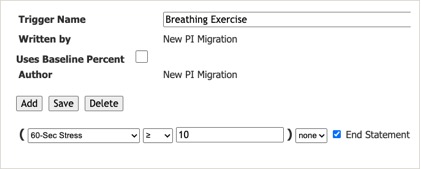
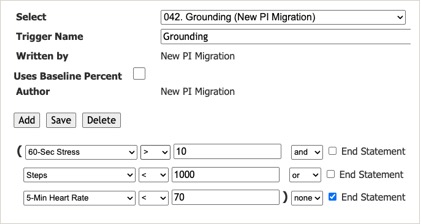
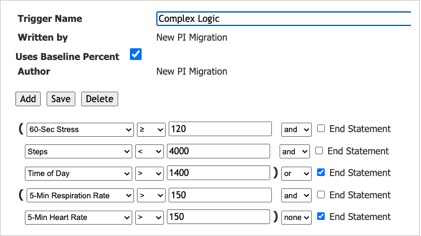
The screenshots below are three real triggers from the Advanced Garmin Triggers builder, in rising order of complexity — each condition is a signal, an operator, a value, and a connector (and / or / none) that either continues the statement or ends it.
1 · One condition
The Breathing Exercise trigger fires on a single absolute threshold — 60-second stress at or above 10. Enough for many designs on its own.
● ● ● MEMA · ADVANCED GARMIN TRIGGERS |
|
2 · A few conditions, joined
The Grounding trigger — the rule shown on the cover — chains three signals: high stress and low step count, or a low heart rate. The closing parenthesis and End Statement on the last row mark where the expression finishes.
● ● ● MEMA · ADVANCED GARMIN TRIGGERS |
|
3 · Grouped, baseline-relative logic
The Complex Logic trigger nests two grouped clauses with parentheses. Note Uses Baseline Percent is ticked, so every threshold (120, 150…) is read as a percentage of the participant's own baseline rather than a raw value.
● ● ● MEMA · ADVANCED GARMIN TRIGGERS |
|
Operators > < >= <= === !== Connectors and or none (ends the statement)
Absolute vs. baseline
Leave Uses Baseline Percent unchecked and a trigger fires on an absolute value (stress ≥ 10, as in rules 1 and 2). Tick it — as in rule 3 — and the same rule adapts to each participant's own normal. Set it per trigger, or across all of them from the Configuration page.
Continuous vs. cumulative
Continuous signals are sampled over 60 s, 5 min, or 10 min windows. Cumulative signals — like steps — accrue across the day.
Near-real-time HRV
Trigger on heart-rate variability, calculated as pNN50 or Avg Standard Deviation. Tune baseline-queue length and window to match your measure.
From rule to action
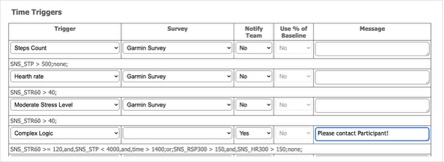
A written trigger does nothing until you assign it. On the Time Triggers table you pair each rule with the survey to deliver, choose whether to Notify Team, and add an optional message. Below, Complex Logic is set to notify the team with “Please contact Participant!” — and the grey line beneath each row is the compiled expression mEMA actually evaluates.
● ● ● MEMA · CONFIGURATION · TIME TRIGGERS |
|
EXAMPLE · PANIC-DISORDER STUDY A 60-second stress reading crosses threshold while the participant is sedentary. The app prompts a guided breathing exercise on the spot; if elevation persists, the care team is looped in. GOES TO Participant · and / or Support Team |